Four MCPs Every Small Brand Should Run in Claude
The four connectors that turn Claude from an advisor into an operator.
By Julia Raciniewska · · 9 min read
Most of the "AI for small business" advice I read stops at the chat window or "top 10 prompts for ...". You ask a model a question, it gives you a competent-sounding answer, and then you go and do the actual work by hand — copy the draft into WordPress, pull the numbers out of Search Console, log into the ads manager. The model never touched anything real.
An MCP — Model Context Protocol server — is what closes that gap. It's a connector that lets Claude reach into a specific system, read what's actually there, and, where you allow it, change it. Not a description of your store: the store. Not last month's memory of your traffic: this week's Search Console. For a brand with a team, that's a convenience. For a brand run in evenings and weekends with no one to delegate to, it's the whole point — it's the difference between advice and a task getting done.
I co-run SEAR Plugs, a water-sports earplug brand I founded, alongside a full-time job in AI. We're stocked by 30+ UK retailers with EU expansion underway, and the operating budget for my time is roughly two evenings and part of a weekend. That constraint is why I only run connectors that pay for themselves. These are the four that do.
1. WordPress / WooCommerce — the one that touches the store
What it is: a connector to your site's content and commerce — posts, pages, products, orders, reports — over the WordPress and WooCommerce REST API.
For most small brands the website is the business, and it's also the thing that stays out of date because editing it is a burden. With the WordPress MCP connected, Claude can read a live product page, rewrite thin copy against the keyword it's actually meant to rank for, and push the change back — or pull this week's orders and tell me which products are moving. The reason this matters more than any other connector: it's the only one that can act on the outcome. Search Console tells me a page is underperforming; WordPress is where I fix it.
For SEAR it's the execution end of our content pipeline. Twice a week, Claude checks the live site for whether we've already covered a topic, then builds a complete WooCommerce-aware draft — not a text file I have to paste in, an actual draft sitting in WordPress waiting for me to approve.
Where it still needs a hand: write access is exactly as dangerous as it is useful. A connector that can publish a post can publish the wrong post. I keep it drafting, never auto-publishing, and the human gate before anything goes live is not optional. An early version of the pipeline once worked off a cached snapshot instead of the live site and started drafting a near-duplicate of a post we'd already published — the fix was making it always check the real site first, which is the whole argument for using the MCP over a model working from memory.
2. Google Search Console — the one that tells you what people actually want
What it is: a connector to your Search Console property — the queries you appear for, clicks, impressions, average position, indexing status.
This is the cheapest market research a small brand will ever get, and most brands never look at it because the interface is a chore and the export is a spreadsheet. Connected to Claude, it becomes a conversation: which queries are we ranking on page two for, where we're getting impressions but no clicks, what's decaying, what's newly winning. That's a content plan sourced from real demand instead of guesses about what customers might search.
For SEAR this is the planning end of the same pipeline the WordPress MCP executes, and it's also what powers the weekly website audit. Search Console data — plus competitor gaps and our EU-expansion priorities — is what turns into a reviewed monthly content calendar. Nothing gets written until the demand shows up in the data first.
Where it still needs a hand: Search Console tells you what's already happening, not what could. It's blind to demand you don't yet rank for at all, and it rewards doubling down on proven queries over making the riskier bets that actually differentiate a small brand. Treat it as the floor of your planning, not the ceiling.
3. Meta Ads — the one that spends money, so treat it carefully
What it is: a connector to your Meta (Facebook and Instagram) ad account. Meta runs an official, sanctioned MCP server at mcp.facebook.com/ads, which matters — ad platforms are exactly where an unofficial, self-built connector risks your account.
For a small brand, paid social is where the largest sums leave the building fastest, and it's the area where a founder without a media buyer is most exposed. With the Meta Ads MCP, Claude can read campaign performance, flag the ad set quietly burning budget at a rising cost per result, spot creative fatigue as frequency climbs, and draft the budget changes — so the review that used to need a specialist becomes a weekly conversation I can actually keep up with.
Where it still needs a hand: this is the connector I trust least with its own hands, on purpose. I let it read, analyse, and propose — I don't let it move money on its own. The official server exists precisely because handing ad-spend control to automation is risky; the whole value is a faster diagnosis, not an unsupervised spender. Every budget change gets my sign-off before it ships.
4. Google Analytics 4 — the one that closes the loop
What it is: Google's official GA4 connector — sessions, conversions, revenue, channel and landing-page performance, queried in plain language instead of built as a custom report.
The other three connectors each touch one stage — publish, plan, spend. GA4 is what tells you whether any of it worked. It's the connector that turns "we did a lot of activity" into "here's what the activity produced," which is the question a small brand can least afford to answer with a vibe. Connected to Claude, the monthly "how did we actually do" review stops being an afternoon of assembling reports and becomes a set of questions answered against live data.
For SEAR it's the measurement layer under everything above: did the content the pipeline published earn sessions, did those sessions convert, did the paid budget actually move revenue or just impressions.
Where it still needs a hand: GA4 will confidently attribute, and attribution for a small brand with a long consideration cycle is often more art than the numbers admit. It's very good at the step-after-the-step you can measure and quietly misleading about the ones you can't — offline retail, word of mouth, the retailer who stocked us because a buyer saw one Instagram post. Read it as one strong input, not the verdict.
Why these four, and in this order
They aren't four separate tools. They're a loop, and each one hands off to the next:
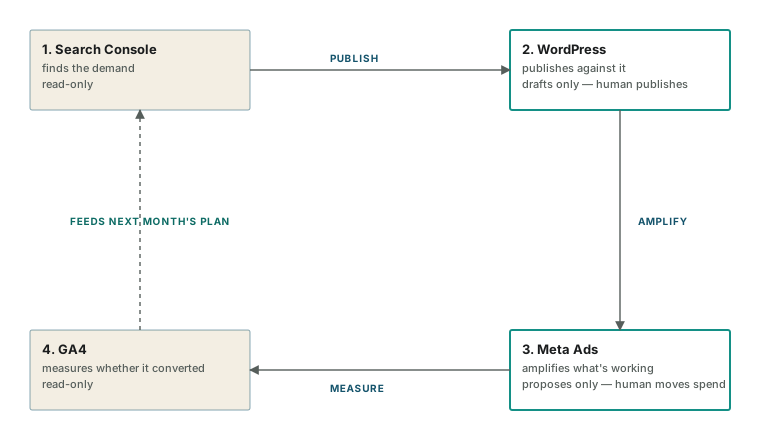
Search Console finds the demand → WordPress publishes against it → Meta Ads amplifies what's working → GA4 measures whether any of it converted → and the answer feeds the next month's plan back at Search Console.
Most small brands own all four of these systems already. What they don't have is a way to move between them without a person doing the copying, exporting, and re-keying by hand. That manual movement between systems is the tax that keeps a small brand's marketing perpetually a month behind. Connecting the four with MCPs is what removes it. The machine handles the movement between systems; I spend the saved time on the judgment calls each system can't make.
One honest caveat that applies to all four: an MCP is a live door into a real system, and read access and write access are very different risks. A connector that can act on your behalf can also act wrongly on your behalf, faster than you can notice. The discipline isn't a nice-to-have — it's the price of the automation being worth running.
I'll keep publishing the individual workflows these connectors sit inside — planning, execution, the weekly audit — with what worked and what didn't, in the AI Workflows section. The connectors are just the plumbing; the system design is where the results actually come from.
Appendix — installing each MCP in Claude
A few notes before the steps. Most of these connect through Claude Desktop's config file (claude_desktop_config.json), reachable via Settings → Developer → Edit Config; after any change, fully quit and reopen Claude so it reloads. Several use npx or uvx, which need Node.js or uv installed respectively. The MCP ecosystem moves quickly, so treat the exact package names below as current-as-of-writing and check each project's own page before installing. And the security rule from above applies at install time too: grant read-only scopes first, add write access only when you actually need it.
1. WordPress / WooCommerce
Two routes, easiest first.
- AI Engine plugin (OAuth — simplest). Install the AI Engine plugin on your WordPress site, then go to AI Engine → Settings → MCP and switch on Enable MCP Server. Because Claude connects over OAuth, you don't need to manage a bearer token — you authorise it like any other login.
- MCP for WooCommerce / REST-API route (more control). Create API keys in WooCommerce → Settings → Advanced → REST API (start with Read permission), then add the WooCommerce MCP server to your Claude Desktop config with your store URL and keys as environment variables. This is the route to choose if you want read-only access to products, orders and sales reports without granting write.
- Verify by asking Claude: "What WordPress abilities do you have access to?"
2. Google Search Console
Community servers here are mature and free.
- Fastest (
uvx): themcp-gscserver runs viauvxwith no cloning or virtualenv —uvxfetches and runs it for you. Add it to your Claude Desktop config per the project's README. - Guided wizard (
npx): runnpx gsc-mcp-server --setup— it opens Google Cloud Console, walks you through creating OAuth credentials, authenticates your Google account, and writes the Claude Desktop config for you. - Auth gotcha: if you use a service account instead of OAuth, you must add that service-account email as a user on the Search Console property — skipping it is the single most common reason calls fail after setup.
3. Meta Ads
Use the official server — this is the one area where a self-built connector can put your ad account at risk, and it's also the easiest of the four to set up.
- Add the official server (URL:
https://mcp.facebook.com/ads) directly into Claude's custom connector settings (Settings → Connectors → Add custom connector). - Authenticate with your Meta Business account through the connector flow — no developer app, no self-hosted server, no separate API keys to manage.
- Once connected you get native tools for reading campaign performance and insights, and for proposing changes. Start it read-only in practice: use it for performance reads and proposed changes, and keep budget edits behind your own approval.
4. Google Analytics 4
- Use Google's official Google Analytics MCP server. It's developer-oriented: create a Google Cloud project, enable the Analytics APIs, set up a service account (or authenticate your Google account), install the server via
pipx, and add it to your Claude Desktop config. - Grant the service account Viewer access to the specific GA4 property under Admin → Property Access Management.
- If the terminal setup is more than you want to take on, hosted no-code bridges exist that connect GA4 to Claude via a login flow instead — fewer moving parts, at the cost of routing your data through a third party.
Field Notes
Get the next article — and the workflows behind it — by email.
Keep reading
AI & automation
How I Use AI to Run a Startup Alongside a Full-Time Job
SEAR Plugs gets evenings, weekends and whatever focus is left after a full working day. Here is how AI and automation make that workable — and where they don't.
· 3 min read
Career & ownership
Flexibility Is Not the Same as Freedom
Remote work and flexible hours are conditions someone else sets. Freedom is what you own: skills, assets, systems and options. Notes on the difference, from someone building both a career and a company.
· 3 min read