Customer Communication
LiveHow I Built an AI Inbox Autopilot with n8n, Claude and Gmail
An always-on n8n workflow that classifies every incoming email, enriches it with real context, and drafts an on-brand Gmail reply — so the inbox opens to reviewed drafts instead of a blank box.
Last updated · Tools: n8n (self-hosted), Claude API — Haiku + Sonnet, Gmail API, Google Sheets
The problem
We run SEAR as two founders, both around full-time jobs. The single biggest operational bottleneck was never strategy or product — it was email. B2B retailers, customers, suppliers and the occasional investor all land in one inbox, and replies were slow because there simply weren't enough evening hours. Slow replies cost real money: a wholesale lead goes cold, a customer loses trust, a warm thread dies.
The goal was never "AI that emails for us." It was narrower and more honest: collapse the time from an email arriving to a good reply being one tap away. Open the inbox to reviewed drafts, not a blank box.
The previous manual process
Replies queued up through the day and got answered in whatever evening hours were left, which meant a backlog that grew every evening rather than shrank. Nothing was lost, exactly — it was just slow, and slow is its own kind of failure in a B2B inbox.
The AI-assisted workflow
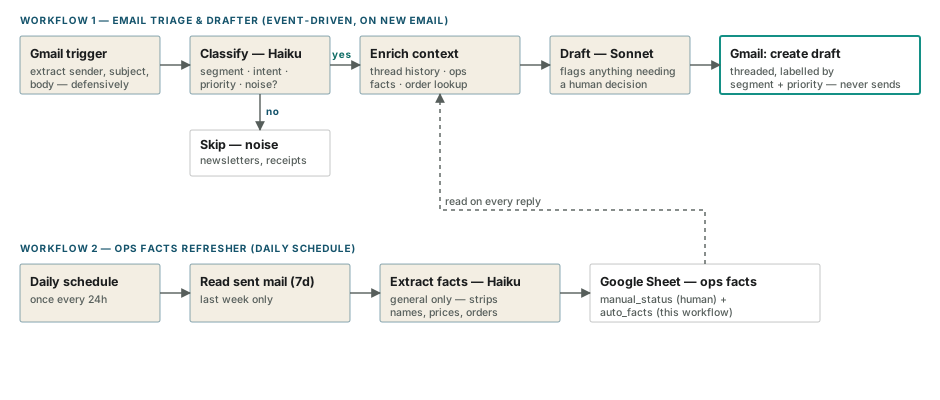
Event-driven, not scheduled. The first prototype ran on scheduled tasks inside a desktop AI assistant. It only worked when the laptop was open, and it billed on a consumer subscription — the wrong model for an always-on background job. The system now runs on a self-hosted n8n instance, live 24/7 on a small cloud server, triggered the moment an email arrives and calling the Claude API directly on metered billing. "Do it when I'm around" became "do it when the email arrives" — that's the whole point of an autopilot.
Cheap classify, expensive write. Every email is first classified by a fast, cheap model (Claude Haiku): who's writing, what they want, how urgent it is, and whether it's noise. Newsletters, receipts and automated notifications stop right there — no draft gets written. Only genuine, actionable mail reaches the stronger, more expensive model (Claude Sonnet) for drafting. A tiny model decides whether the expensive model runs at all, so the whole system stays cheap by construction.
Three layers of memory, deliberately separated. A reply is only as good as what the model knows, and different kinds of context change at different rates and carry different trust levels:
- Thread history — before drafting, the workflow reads the actual Gmail thread, not an internal memory store. That's the true record, including replies sent manually from a phone that a workflow-only memory would miss.
- Operational memory — a second workflow runs once a day, reads the last week of sent mail, and asks Claude to extract only general facts (stock, restock dates, shipping delays) into a shared Google Sheet, explicitly stripping anything customer-specific. The drafter reads that sheet on every reply, so a fact told to three customers this week reaches customer four automatically — without re-scanning the whole sent folder on every single email.
- Brand context — customer-safe product facts, pricing and policy, embedded directly in the drafting prompt. Confidential material never goes near a prompt.
The prompt carries a strict priority order — a hand-edited "manual status" row in the sheet beats this thread's history beats the auto-detected notes, and newer always beats older — plus one hard rule: only state facts that are in the provided context, and say you'll confirm rather than invent one that isn't.
The inbox as its own dashboard. Rather than build a separate CRM or status UI, drafted threads are tagged with Gmail labels for segment (Customer / B2B / Investor / Ops) and priority (P1–P4), colour-coded. A glance at the inbox shows what's waiting and how hot it is — no new tool to check, no database to keep in sync.
Human review required
Before any code was written, we fixed one rule: every reply is created as a Gmail draft, and nothing sends itself. This is a control and brand-safety decision, not a technical limitation — it's what makes it acceptable to put a language model near customer communication at all. If a draft is wrong, off-tone, or leans on a fact that's changed, a human catches it in the few seconds it takes to review before hitting send. It's also what lets the rest of the system be aggressive about automation: the last mile is always human, so a bad draft is a non-event, not an incident.
Outcome
Hosting runs a few dollars a month; API usage is a few more, since the cheap-classify pattern keeps the expensive model off noise entirely. For that, the inbox went from a backlog that grew every evening to a folder of reviewed drafts that clears in minutes from a phone. The founders still make every send decision — they just never start from a blank page.
Reusable lesson
Automate to a human gate, not to send. The value of this system isn't that AI writes emails — plenty of tools do that — it's that a tiny model triages before the expensive one ever runs, three genuinely different kinds of memory are kept separate instead of conflated into one fuzzy context blob, and every draft still waits for a human before anything leaves the building.
Resources
The two workflows — sanitised, with all brand-specific values replaced by placeholders — are published under n8n/email-autopilot in the SEAR Plugs optimisation workflows repo, along with a "fill in your brand" guide and the Google Sheet template for operational memory.
01-email-triage-drafter.json— the event-driven drafter: classify, enrich, draft, create the Gmail draft, apply labels.02-ops-facts-refresher.json— the daily batch job that keeps the shared operational-memory sheet current./templates— a ready-to-fill brand-context file and the sheet layout for operational memory.